


Google AI Essentials course
Estimated reading time: 19 minutes
I took Google’s AI Essentials course on Coursera, which costs $49 and took me 5 hours, to see if it’s truly worth your time and money. Here are the lessons I learned from the course and whether you should take it.
Quick Overview
| Platform | Coursera |
| Course | Google AI Essentials |
| Provider | |
| Duration | Approx. 5 hours (1 week) |
| Enrolled | 1,052,904 |
| Difficulty | Beginner |
| Rating | 4.7 (11,132 reviews) // if can put stars png on it |
| Price | $49 Or Coursera Plus |
Table of contents
The course is divided into 5 modules, from an introduction to AI to staying up to date with AI advancements. Beyond that, you’ll learn prompt engineering and how to write prompts like a pro, all while focusing on responsible AI use and maximizing your productivity with AI.
Module 1: Introduction to AI
Videos: 11 | Readings: 4 | Practice Assignment: 1 | Dialogue: 1 | Graded Assignment: 1
The course begins with an introduction and overview of the course covering the basics of AI. To start the first module, let’s examine the term “Artificial Intelligence” and how it’s powered by a technology called “Machine Learning.”
Next, we’ll explore how AI has evolved into what’s now known as “Generative AI,” along with its capabilities and limitations.
// how it’s used as a collaborative tool and makes daily tasks easier.
Machine learning
When you go to Youtube or other streaming services, have you ever wondered how the videos you like to watch just mysteriously appear? Well, this is no coincidence, because it’s the AI curating recommendation systems based on your watch history, watch time, and other behaviors. This is an example of an “AI tool.”
These AI tools are not self-taught. Instead, they are powered by Machine Learning (ML), which is a subset of AI focused on developing computer programs that can analyze data to make decisions or predictions. Machine Learning is just one part of the broader field of AI.
Case example of machine learning
Let’s say you own an apple factory and your job is to sort ripe and unripe apples. You might want to use an AI tool to automate the process. First, you build an ML program using a “training set” containing many examples of ripe and unripe apples.
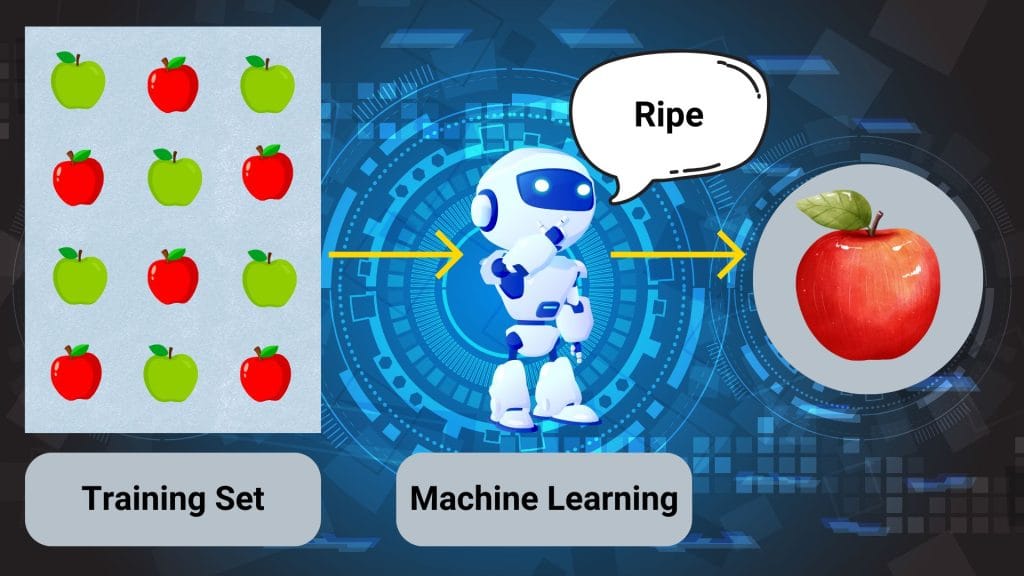
The ML program learns to recognize the characteristics that distinguish ripe apples from unripe ones. As a result, the AI tool can now identify ripe apples it has never seen before, even if they weren’t part of the training data.
An important consideration is the quality of the data provided, including any biases in the training data. For example, if the AI tool used to sort ripe and unripe apples is trained only on images of red apples, it might mistakenly classify a ripe green apple as unripe.
Generative AI
Generative AI just like its name suggests, can generate new content, like text, images, videos, or other media. This subset of AI has become very popular over the years and is the main focus of this course.
Generative AI works with “natural language.” Here’s how it works:
- Provide inputs
Input in this case is any information or data that is sent to a computer to be processed. This is also called “prompt.” As of writing this, all of the popular AI models from different companies have integrated text, images, video, audio, code, and documents (word, sheets, slides) as AI inputs.
Pro Tip: You can combine text, image, and video inputs in a single prompt. This is called Multimodal Prompting.
- Data is processed
Simply the data that is inputted, for example, a video is processed by AI. Then it reads and understands the video that was inputted.
- Output is generated
After processing the input, it then generates the output. The output can also be generated in the form of text, images, video, audio, code, or documents.
Case example of generative AI
Let’s take the previous example of owning an apple factory, now your job is to sell these apples to suppliers and consumers, but you don’t have a marketing team to create posters to advertise your business. Well, why don’t you ask AI?
In 5 minutes or less and a simple prompt, generative AI can create posters for your apple business. If the AI-generated posters don’t meet your expectations, you can always “Iterate” until you find one that fits your imagination.
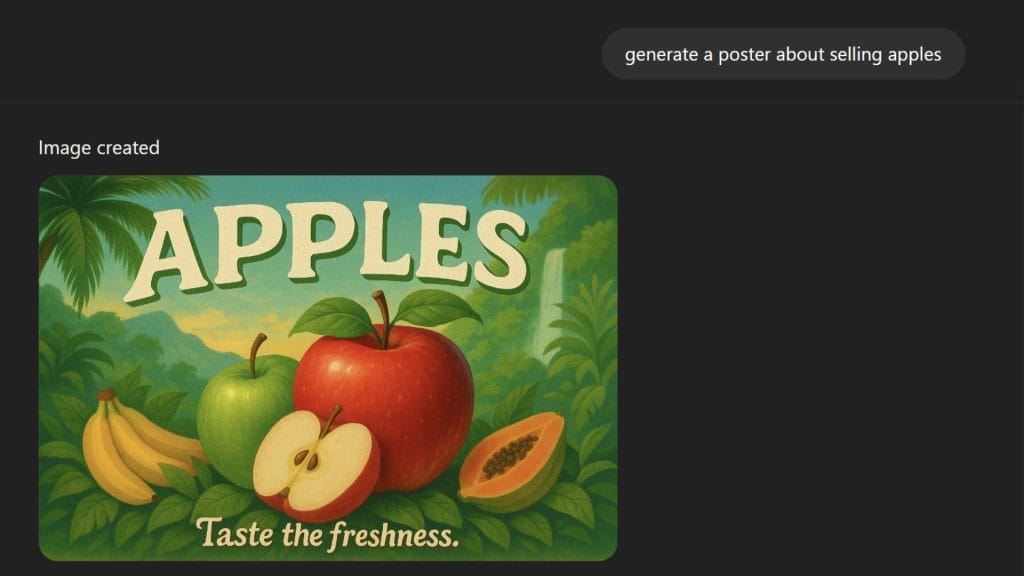
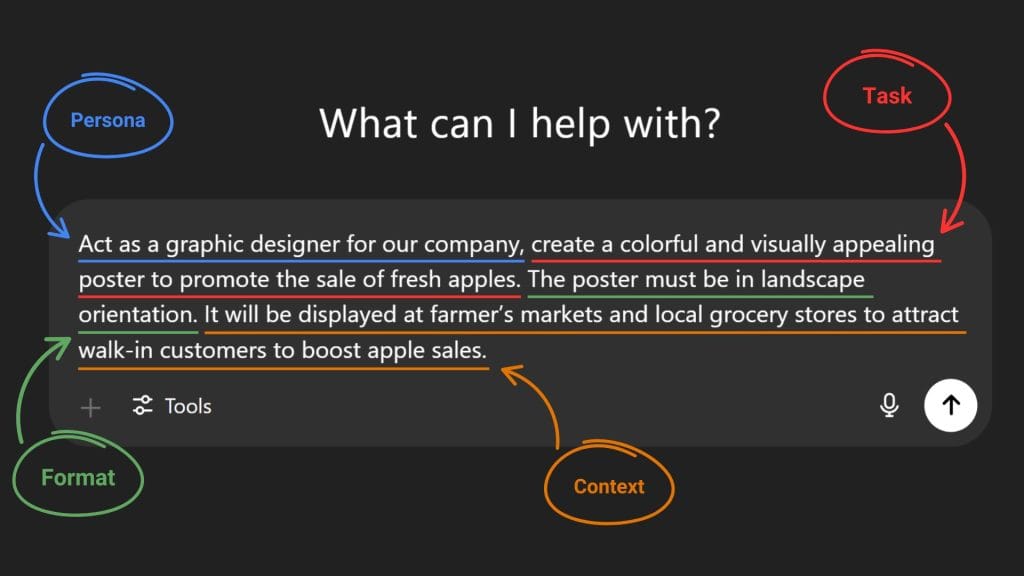
Pro Tip: The image above shows a prompt that is too generic and might result in a less personalized and accurate output. To fix this we’ll use the “5 Step Prompt Framework” from Google prompting essentials’s course and add “Persona,” “Task,” “Format,” and “Context” to enhance the prompt and get more specific and personalized results.
Capabilities and limitations of AI
So far, we’ve seen that AI can generate content, analyze and summarize information quickly, answer complex questions, and simplify daily tasks. However, AI also has its limitations. These include the inability to learn independently, the potential to produce biased results, and the risk of generating inaccurate outputs.
These inaccurate outputs are known as “hallucinations.” Hallucinations can range from minor, harmless mistakes to serious, potentially harmful errors.
Case example of AI hallucination
Let’s revisit the example of the apple factory. This time, we’ll use an AI tool to analyze its sales. The AI might identify a decline in sales of seasonal apples and flag them as underperforming items that should be removed from stores. However, since people typically buy seasonal apples during their peak season, the AI’s analysis and recommendation could lead to significant sales losses for the factory.
To prevent this from happening, human oversight is needed to supervise and review AI-generated output, ensure there are no anomalies, and verify that the information is accurate.
Harmless example of AI hallucination
Module 2: Maximize productivity with AI tools
Videos: 11 | Readings: 3 | Practice Assignment: 2 | Graded Assignment: 1
The second module is about using generative AI to tackle both work and personal tasks to help you maximize productivity. In this part of the course, you’ll explore practical applications of generative AI that can elevate the way you work. Throughout the course, you’ll also learn more on how to boost your productivity with AI tools.
Without further ado, let’s start off module 2 by learning and applying “human-in-the-loop” approach to AI.
Apply human-in-the-loop approach when using AI
Human oversight over AI is crucial, that’s why the “human-in-the-loop” approach is needed when interacting with AI.
Consider the apple factory business from module 1, you as the owner need to design a brand slogan for the apple business. First, you prompt the AI with keywords that you’d like to feature in the slogan, and the AI generates a list of ideas. As you review the AI output, you find a catchy slogan that stands out. However, it’s a bit too long. So you “Iterate” the prompt and ask the AI to make the slogan shorter. One prompt later, you got a catchy slogan for your apple business.
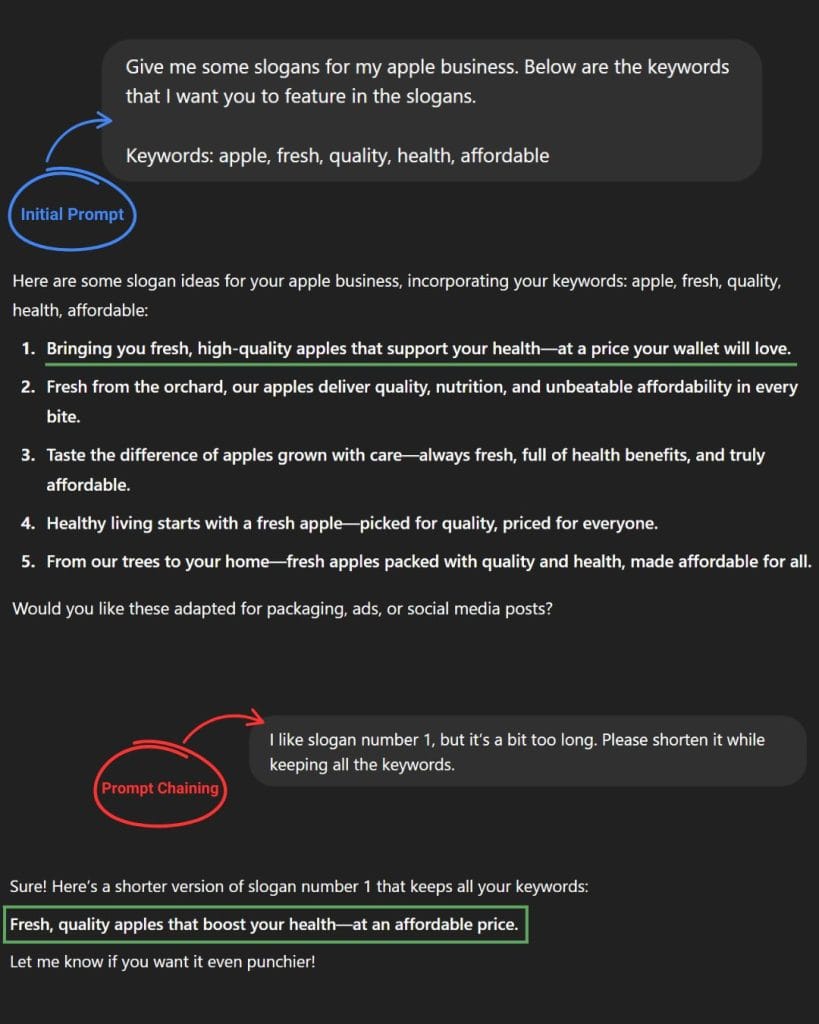
This “human-in-the-loop” approach ensures that you get the best results from generative AI. By combining AI with human insight, you’re more likely to produce an output that meets your expectations.
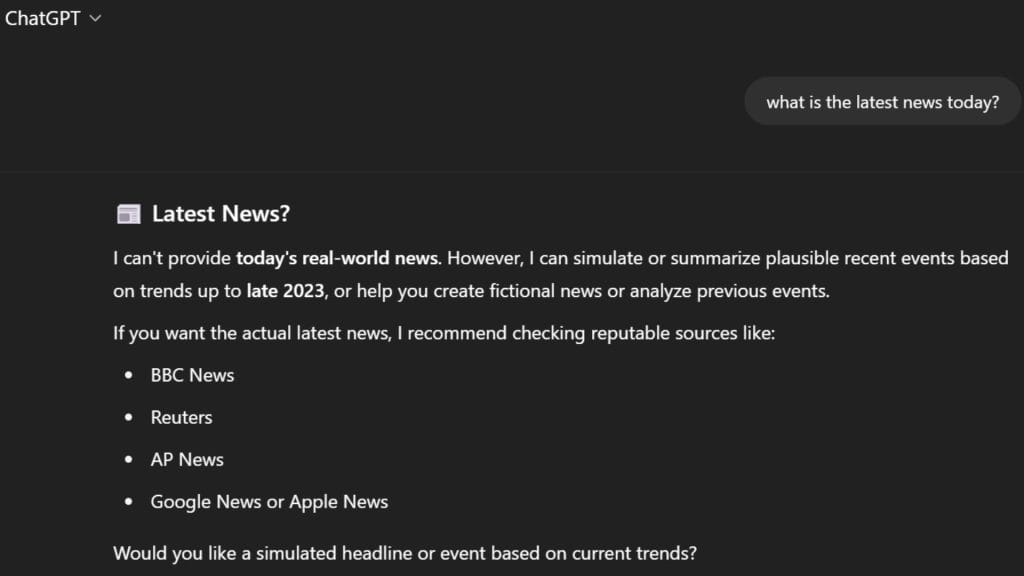
Knowledge cutoff
AI models “knowledge cutoff” refers to the date that an AI is trained at a specific point in time. This means that everything that happened after its training date, the AI would have no knowledge of events or information about.
So if you ask an AI “what is the latest news today?” it would not know the answer to that.
Choose the right AI model
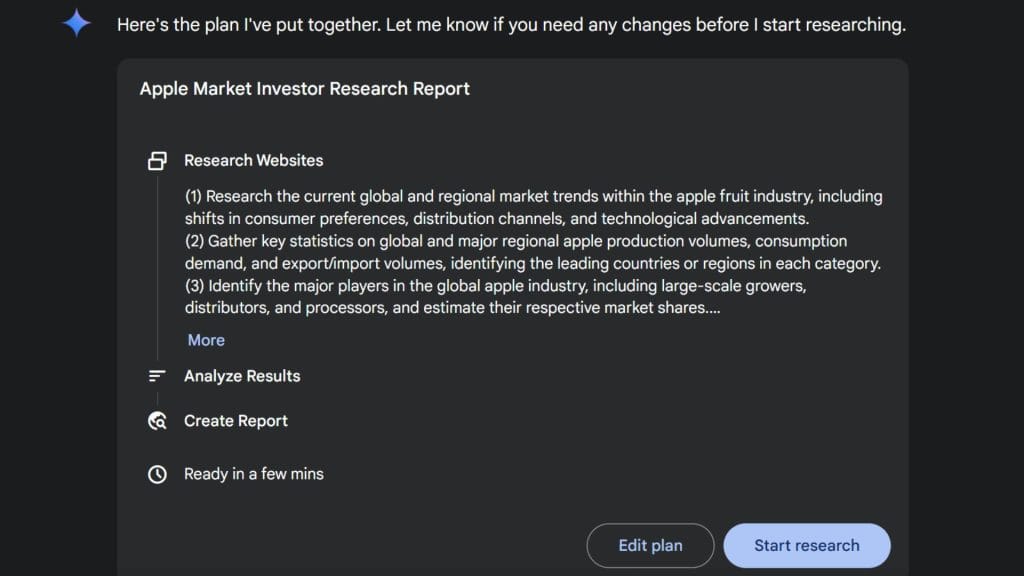
Imagine you are doing research for an upcoming pitch to persuade investors to invest in your apple business. Before you start prompting, you first need to choose the right “AI model” for the job. You’re thinking of showing your potential investors the market for apple fruit and how profitable it is, so you use an AI model with “Deep Research” integrated.
After all that research it’s time for you to create a powerpoint presentation for the pitch. This time you need images to complement your slides. So you use an AI model that can generate images, in this case it’s gemini 2.0 flash image generation.
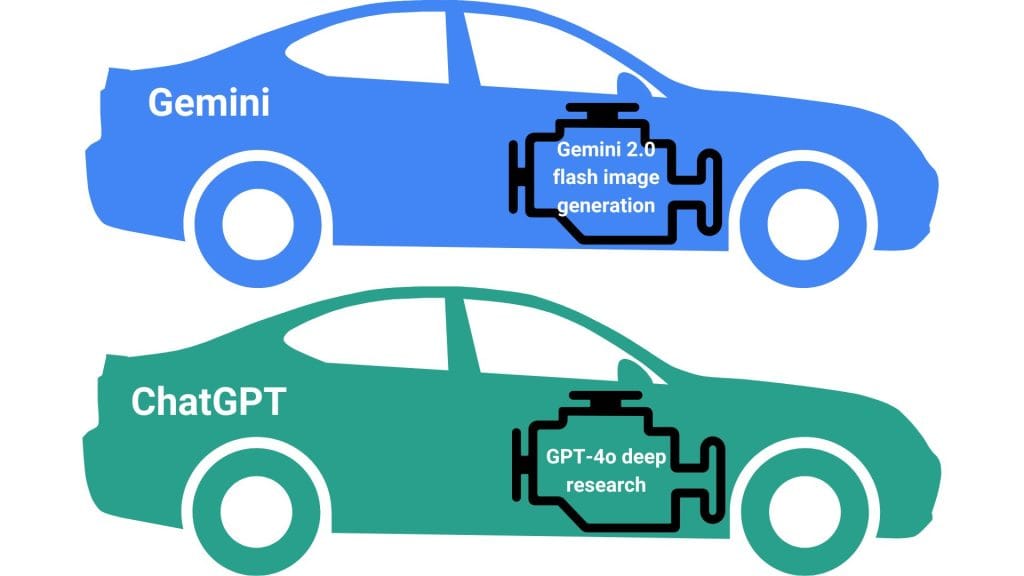
The purpose of the example above is to illustrate how different AI models function. You can think of AI models as different types of engines, each with unique capabilities like deep research or image generation, and AI tools as different types of cars built on platforms like Gemini or ChatGPT.
Module 3: Discover the art of prompting
Videos: 9 | Readings: 4 | Practice Assignment: 2 | Dialogue: 1 | Graded Assignment: 1
The third module is one of the most important in this course because the way you phrase your words when prompting can significantly affect how generative AI responds.
First, you’ll learn how LLMs generate output from prompts. Then, you’ll explore how prompt engineering can improve AI’s output. Next, we’ll take a look at the 5-step prompt framework and how it can help you write better prompts. Finally, the course provides some techniques for you to create effective prompts.
Understand how large language models work
A Large Language Model (LLM) is an AI model trained on millions of text sources, such as books, articles, and websites. This extensive training allows the model to learn patterns in language and better understand how humans communicate.
Here’s a quick and simple example of how LLMs works:

In this case, the LLM is likely to choose the word with the highest probability, such as ‘wet’ or ‘damp’, to complete the sentence. However, the LLM’s response may vary each time you run the same prompt and you might get the word “wet”, “damp”, or synonyms of those words.
Capabilities of LLMs
Generative AI relies on large language models to perform a wide range of tasks. In this course, there are 7 ways to use LLMs to boost your productivity and creativity: content creation, summarization, classification, extraction, translation, editing, and problem-solving.
For this example, we’ll use “summarization” to turn a lengthy text into a one-sentence summary.
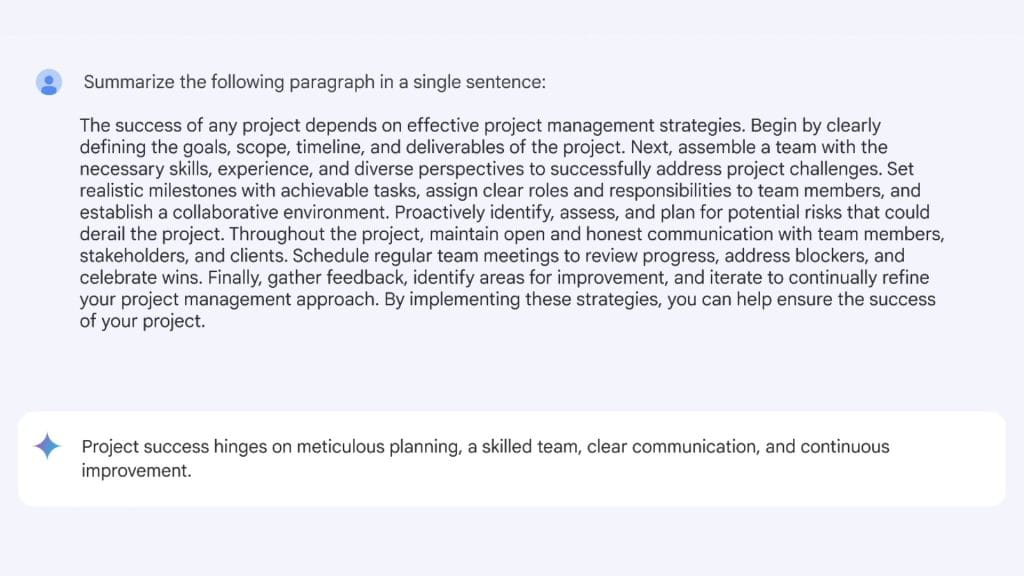
While this example only shows you how to summarize a single paragraph, you can also ask LLMs to summarize longer text or even documents like PDFs, spreadsheets, or powerpoint slides.
Advanced AI report summarization
This is just 1 of 7 ways to take advantage of an LLM’s capabilities. To see the rest of the examples, you can visit the “extended resources article” for this course.
All 7 examples of using LLMs to boost workflow
Limitations of LLMs
For every upside, there is also a downside, and the same applies to LLMs. One of their biggest limitations is biased output, which can happen because the data they were trained on contains bias. For example, an LLM might generate responses that reinforce gender stereotypes.
Avoid biased outputs when prompting
Another important point to note is that just because today you prompt an LLM to achieve an output that meets your expectation doesn’t mean you’ll get the same output again even if you use the exact same prompt in the future.
Prompt engineering best practices
To get the best results from generative AI, it’s important to craft prompts using a framework. That’s where the 5-Step Prompt Framework comes in. It consists of five elements: Task, Context, References, Evaluate, and Iterate.
Specify the task
Task refers to what you want the AI to generate. Rather than writing a vague prompt like “write me an email to my employees about a new work schedule,” you can elevate your prompt by adding persona and format.
Persona:
“You’re a grocery store manager.”
Task:
“Write me an email to my employees about a new work schedule.”
Format:
“The email must be professional and brief so the employees can skim it easily.”
Provide necessary context
Including detailed context in your prompts can enable AI to generate more personalized results. The key is, the more context you put in a prompt, the more specific the output will be.
Context:
“Explain that this new work schedule will reduce employees’ workload while improving efficiency.”
Include references as examples
References provide examples or resources that help the AI generate a response based on the information they contain. These could be examples for the AI to follow or resources for it to analyze.
References:

“Follow the layout shown in the image.”
Here’s the full prompt:
You’re a grocery store manager. Write me an email to my employees about a new work schedule. Explain that this new work schedule will reduce employees’ workload while improving efficiency. The email must be professional and brief so the employees can skim it easily. Follow the layout shown in the image.
Evaluate your output
Once you receive an output from generative AI, it’s always a good idea to review and evaluate the AI’s output and make sure all the criteria are checked. Here’s guidelines from the course when evaluating an output:
- Accuracy
- Bias
- Relevancy
- Consistency
If the output meets all the criteria and your expectations, congrats. You are now a prompt engineering master. But if the result is unsatisfactory or could be improved, iterating on the prompt may lead to better results.
Iterate for better results
If the result of your prompt doesn’t satisfy your needs, then iteration is the final step to getting quality outputs. The process of iteration requires you to continuously refine your prompts by having a back-and-forth conversation with the AI. It goes like this:
You provide an initial prompt → The AI tool responds with an output → You evaluate the effectiveness of the AI-generated response → You refine your request based on what worked and what didn’t → The cycle repeats until you produce the desired results
Pro Tip: For better results, consider following the 4 iteration methods. These include revisiting the 5-step prompt framework, breaking the prompt into shorter sentences, rephrasing or switching to an analogous task, and adding constraints to your prompts.
4 iteration methods
Techniques for prompt engineering
In prompt engineering the word “shot” refers to the number of examples given to an AI tool. The number of examples determines the naming of different prompting techniques.
For example, zero-shot prompting refers to a technique that doesn’t provide any example in a prompt. One-shot prompting provides only one example, and few-shot prompting provides two or more examples.
Zero-shot prompting
Since there are no examples included in zero-shot prompting, the model solely relies on its training data to perform tasks. This is particularly useful when you’re seeking for simple and direct responses.
One-shot prompting
One-shot prompting introduces context to the model which results in a more accurate output. It’s the perfect balance for a relatively time-efficient way to prompt while providing the AI contextual understanding.
Few-shot prompting
For maximizing quality outputs, few-shot prompting provides different kinds of examples to your prompt. These additional examples can help AI pinpoint the format, phrasing, or general pattern of your desired output.
Case example of few-shot prompting
The last two prompting techniques are mostly for complex tasks and are considered advanced in prompt engineering. These techniques leverage AI’s problem solving capabilities to handle complicated work one step at a time.
Chain-of-thought prompting
“Chain-of-Thought Prompting” is a technique where you prompt a large language model to explain its thinking process step by step. To use this technique, you need to include phrases like “explain your reasoning” or “go step by step” into your prompt in order to trace its thought process.
Prompt chaining
Prompt chaining just like its name, connects prompts together just like a chain. It involves prompting the LLM to break down a complex task into a series of simpler tasks. So rather than simply using a single prompt, prompt chaining works by expanding on previous outputs just like the concept of iteration.
Pro Tip: You can combine prompt chaining with chain-of-thought prompting to significantly enhance the problem-solving process.
Case example of combining prompt chaining with chain-of-thought prompting
Module 4: Use AI responsibly
Videos: 7 | Readings: 2 | Graded Assignment: 1
There are lots of different harms that can be caused by AI tools. Some of these harms are the results of biased outputs. In this module, we’ll discuss the types of biases and harms and how it affects the AI tools.
We’ll also cover how to practice “responsible AI”, including how to protect your privacy and security as an “AI user”.
Types of biases in AI
AI models are trained on data created by humans, so they must consist of values and are subject to bias. In the course it mentioned 2 different types of biases: systemic bias and data bias. These biases can affect the output and lead them to inaccurate results.
Systemic bias
Humans are influenced by systemic biases, this is why even with high-quality data, an AI model will still experience “Systemic Bias.” These kinds of bias exist within societal systems like healthcare, law, education, politics, and more.
Case example of data bias
Let’s say you’re in the middle of creating a presentation and need a few images of made-up CEOs. So you prompt the generative AI to create images of made-up CEOs. The result shows images of only “white males.” Based on this result, the AI assumes that all CEOs are only white men, which is completely biased and untrue.
This type of bias is called data bias, which reflects the biases found in the data used to train the model. Generally, the more an AI model is trained on images of white men as CEOs, the more likely it is to produce similarly biased outputs. However, if the training data includes a more diverse range of CEOs, the AI is more likely to generate more inclusive images of CEOs.
Different kinds of harms when using AI
There are different types of harm to be aware of when using AI. The course mentions 5 potential harms and provides examples of how using AI irresponsibly can negatively impact people and communities.
Allocative harm
“Allocative Harm” occurs when an AI tool wrongly judges someone as unqualified. For instance, an AI used for tenant screening might misidentify an applicant as high-risk due to a low credit score, leading to a denied rental and a lost application fee.
Quality-of-service harm
“Quality-of-Service Harm” occurs when an AI tool performs poorly for certain groups. For example, Early speech-recognition systems struggled to understand people with disabilities because their speech patterns were underrepresented in the training data.
Representational harm
“Representation Harm” for instance, might associate certain words with feminine or masculine traits. As an example, the AI model in early translation tools would refer to a “nurse” as a woman, and a “doctor” as a man.
Social system harm
As AI-generated images and videos become more realistic, concerns about the spread of disinformation are growing, particularly with the rise of deepfakes. For example, a deepfake might depict a presidential candidate saying something controversial they never actually said. If it went viral, it could potentially cost them the election.
Interpersonal harm
Let’s say your roommate plays a prank by using an AI tool to take control of a smart home device and mess with you. This is an example of “Interpersonal Harm,” where such actions can lead to a loss of personal agency and a diminished sense of self.
Responsible AI practices
As an “AI user,” it’s important to be aware of how your data are collected, stored, and used, especially when it comes to “privacy” and “security.” Since user inputs are another way to train AI models, it’s advised to never put any private information when interacting with an AI to prevent security risk.
Pro Tip: When practicing responsible AI, make sure to apply the “human-in-the-loop” approach to verify if the AI generated output is accurate and doesn’t contain any false information.
Module 5: Stay Ahead of the AI Curve
Videos: 9 | Readings: 2 | Practice Assignment: 1 | Graded Assignment: 1 | Survey: 1
As AI continues to evolve, there’s always more to learn about new and emerging AI models. The final module of this course teaches you how to stay up to date with AI and leverage it in your work.
Staying up-to-date with AI
Consider the evolution of phones, from telephones to the smartphones we use today. AI is experiencing similar growth, which is why it’s important to keep up to date with the latest AI models.
For instance, the demand for AI-related skills is growing across every sector. Therefore, expanding your AI knowledge and skills may lead to better job and financial opportunities. That’s why this article was created in the first place. So, how can you leverage AI in your work?
Leverage AI at work
Let’s say you have a task that involves summarizing. You can include AI in the process, but it’s important to stay actively involved in both the process and decision-making. This means continuously evaluating the AI’s output, iterating on it, and making edits to achieve the best possible result rather than simply copying and pasting it.
The course also provides strategies to leverage AI in your work:
- Examine the tasks you do on a typical day.
- Analyze your work process as a whole.
- Address challenges in your work process whenever they arise.
Conclusion and writer’s note
Congrats, you’ve completed Google’s AI Essentials Course. Now the question is, should you invest 6 hours of your time and $49 (or use a Coursera Plus subscription) to access this course? Yes if you’re aiming to earn the certificate, and no if you’re only here for the knowledge
The reason is that you can access almost everything in this course for free (except for the readings, assignments, dialogues, and certificate). Since this course is by Google, all of its main points are available for free on YouTube.
So if you decide not to spend money on this course, you can either learn from this article, which includes all the resources and lessons from the course along with extra tips from Google’s Prompting Essentials that relate to this course, or you can watch the course playlist on YouTube.
For those paying for the course, I hope you’re satisfied with the content and able to earn the certificate. You can also use this article as a guide to help you complete the course.
If you’d like to explore the extended version of this course, which offers in-depth coverage of all modules, more examples, and extra lessons not included in this article, click the link below. It will redirect you to the “Google AI Essentials Extended Course” article.
Google AI Essentials Extended Course
That’s all from me for this article. I hope you found it valuable and learned lots of new things about AI. This is Moses Giroth signing off—happy learning!