Google AI essentials extended course
Estimated reading time: 12 minutes
I took Google’s AI Essentials course on Coursera, and this is the extended version of that course. It covers all the modules in greater depth and includes additional examples that were not part of the main course.
I Took Google’s 5 Hour AI Essentials Course Curated in 20 Minutes
Table of contents
- Google AI essentials extended course
- Module 1: AI for professionals
- Module 2: When to use generative AI
- Module 3: AI prompts for different purposes
- Module 3: Improve AI output through iteration
- Module 3: Case example of combining prompt chaining with chain-of-thought prompting
- Module 4: Harms of using AI and how to mitigate them
- Module 5: Elevate work with multimodal models
Module 1: AI for professionals
Applying AI to professional tasks can enhance the quality of our work and simplify many of the tasks we perform on a day-to-day basis. The course mentions two concepts designed to improve your workflow efficiency.
Case example of AI augmentation
Think of your work, it likely consists of a variety of tasks. These can range from routine activities like responding to emails to more complex tasks such as brainstorming ideas for a new business.
“AI augmentation” can help you write emails by suggesting relevant phrases and correcting grammar and spelling mistakes. It can also assist in brainstorming new business ideas by conducting market research for a specific niche. By augmenting your work, AI can complete your tasks faster and more efficiently.
Case example of AI automation
AI can also help you automate your work, preferably repetitive tasks. After finding new business opportunities and a few years of dedication, you’re now a successful business owner. With an ever-growing business, you now receive hundreds of emails every day from potential partnership and customers.
Instead of spending lots of time reading and responding to each email, you can use AI to automatically sort emails based on priority. For emails with low-priority, you could use AI combined with “human-in-the-loop” approach to get quality email responses. By automating this task, you could then focus on high-priority emails that require your personal attention.
Module 2: When to use generative AI
When using “Generative AI,” it’s important to understand what it can and can’t do. To find it out, the course has provided three criteria on whether to apply generative AI to a task or not.
Is the task generative?
Imagine you’re creating a flyer to promote your business, for some of the images, you decide to use AI to generate the images. But before that, start by asking if the task is generative? If the answer is yes, then you can move on to the next criteria.
Can the task be iterated on to achieve the best outcome?
The second criteria involves refining the prompt. Let’s say the generative AI created images that isn’t to your liking. Instead of scraping all of the images, you can try to “Iterate” your prompt until you get the desired result.
Pro Tip: Use the 4 Iteration Methods to get the most accurate output.
Are there resources to provide adequate human oversight?
The final criteria requires you to “Evaluate” the AI-generated images before putting it into the flyer. Remember, you should apply the “human-in-the-loop” approach when reviewing the images. So if there are errors in the images, you can go back and iterate it again until it’s flawless.
In the Text Box: If all three criteria are met, then using generative AI is the right call.
Module 3: AI prompts for different purposes
There are many ways to use a Large Language Model (LLM). The course outlines 7 use cases for writing AI prompts for different purposes, along with examples from the course.
Prompt for content creation
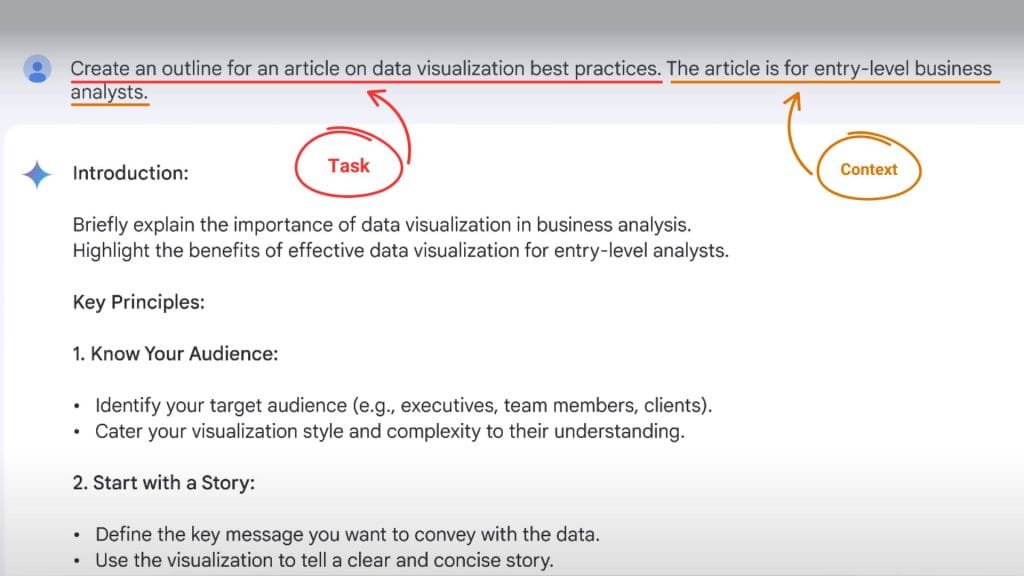
Suppose you’re assigned to write an article about a work-related topic. So you prompt generative AI to create an outline for that article. Here’s the structure of the prompt:
Task:
“Create an outline for an article on data visualization best practices.”
Context:
“The article is for entry-level business analysts.”
Prompt for summarization
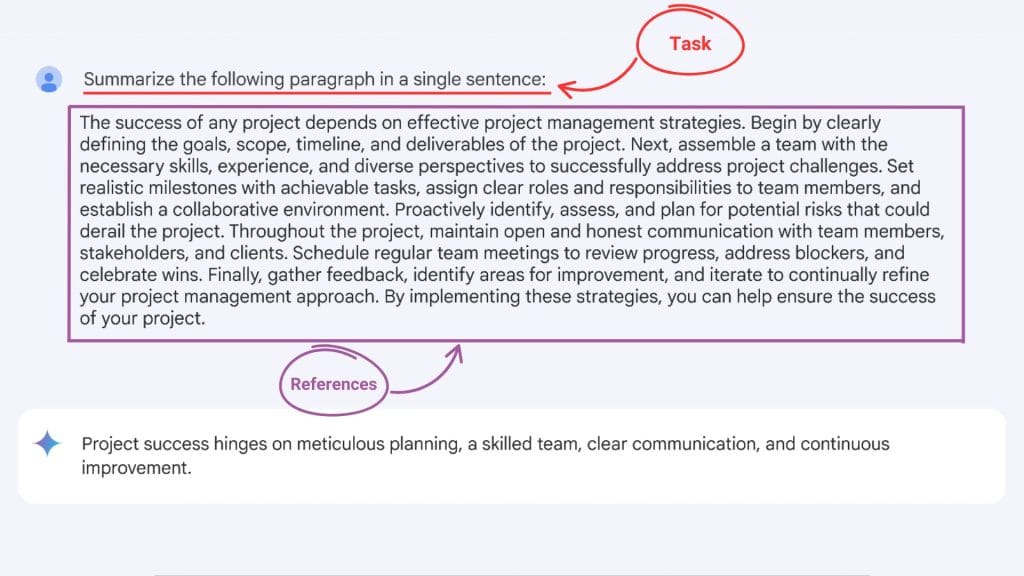
For this example, we’ll use an LLM to summarize a detailed paragraph about project management strategies into a single sentence main point.
Task:
“Summarize the following paragraph”
Format:
“in a single sentence.”
References:
“The success of any project depends on… the success of your project.”
Prompt for classification
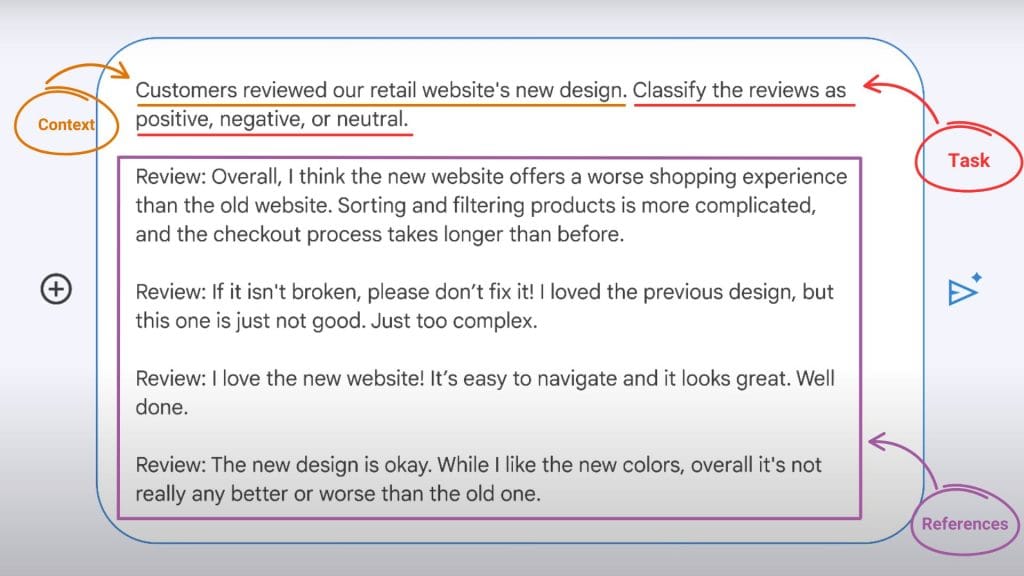
Imagine you’re trying to classify customers’ reviews of a retail website’s new design into positive, negative, or neutral. Here’s how you might prompt an LLM to classify the reviews:
Context:
“Customers reviewed our retail website’s new design.”
Task:
“Classify the reviews as positive, negative, or neutral.”
References:
“Review 1: worse shopping experience than the old website.
Review 2: if it isn’t broken, please don’t fix it!
Review 3: I love the new website!
Review 4: It’s not really any better or worse than the old one.”
Prompt for extraction
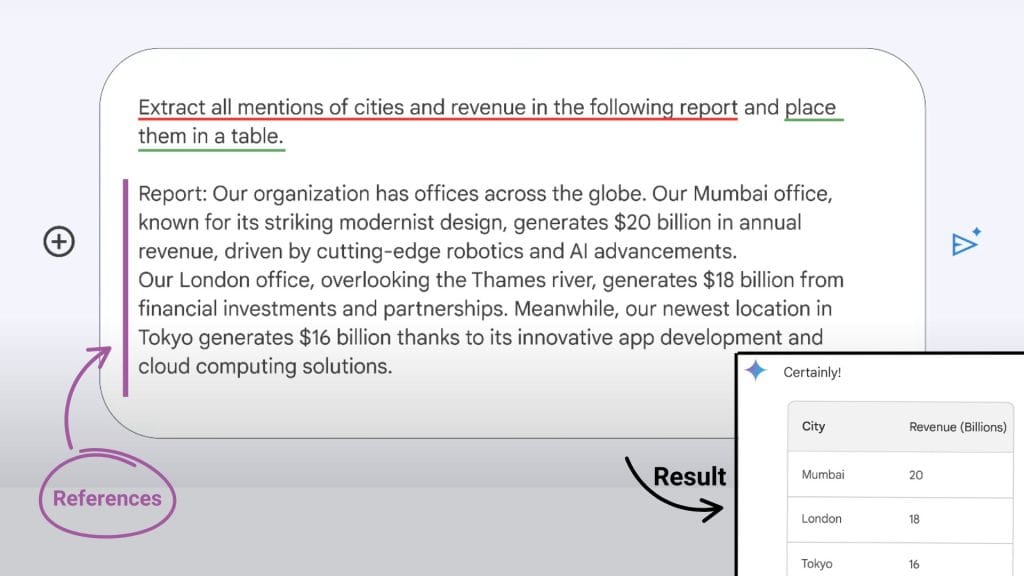
Extraction involves pulling data from text and transforming it into a structured format that’s easier to understand. Here’s the prompt framework for extracting a report that provides information about a global organization.
Task:
“Extract all mentions of cities and revenue in the following report.”
Format:
“place them in a table”
References:
“Report: Our organization has offices across the globe…”
Prompt for translation
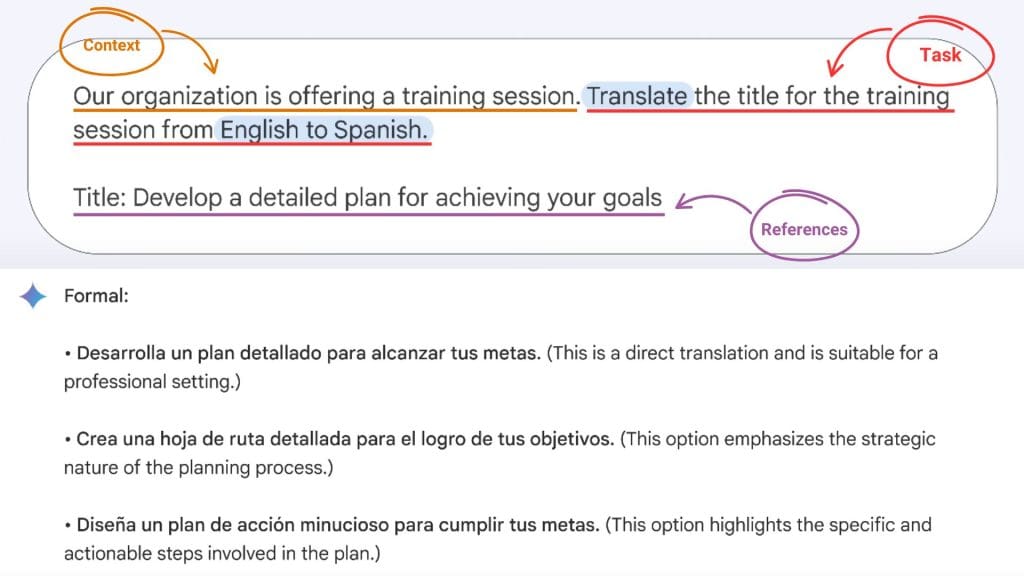
You can use an LLM to translate text between different languages. Let’s say your organization is looking to translate a title of a training session from English to Spanish. Here’s how to structure your prompt:
Context:
“Our organization is offering a training session.”
Task:
“Translate the title for the training session from English to Spanish.”
References:
“Title: Develop a detailed plan for achieving your goals”
Prompt for editing
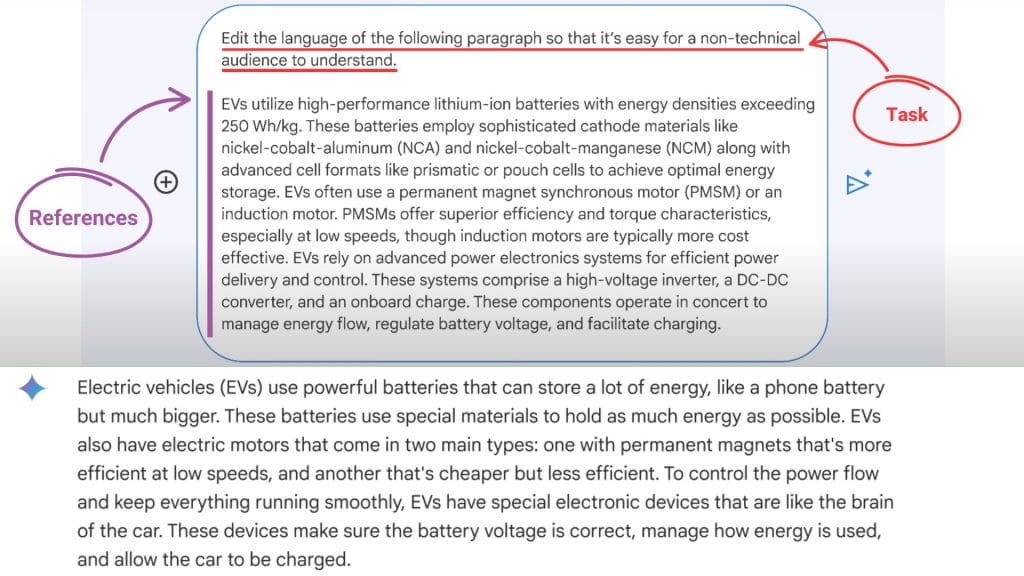
Let’s say you have a paragraph filled with a bunch of technical terms about electric vehicles. An LLM can change the paragraph from technical to casual and check if there’s grammatical errors.
Here’s the prompt:
Task:
“Edit the language of the following paragraph so that it’s easy for a non-technical audience to understand.”
References:
“EVs utilize high-performance lithium-ion batteries with energy densities exceeding 250 Wh/kg…”
Prompt for problem-solving
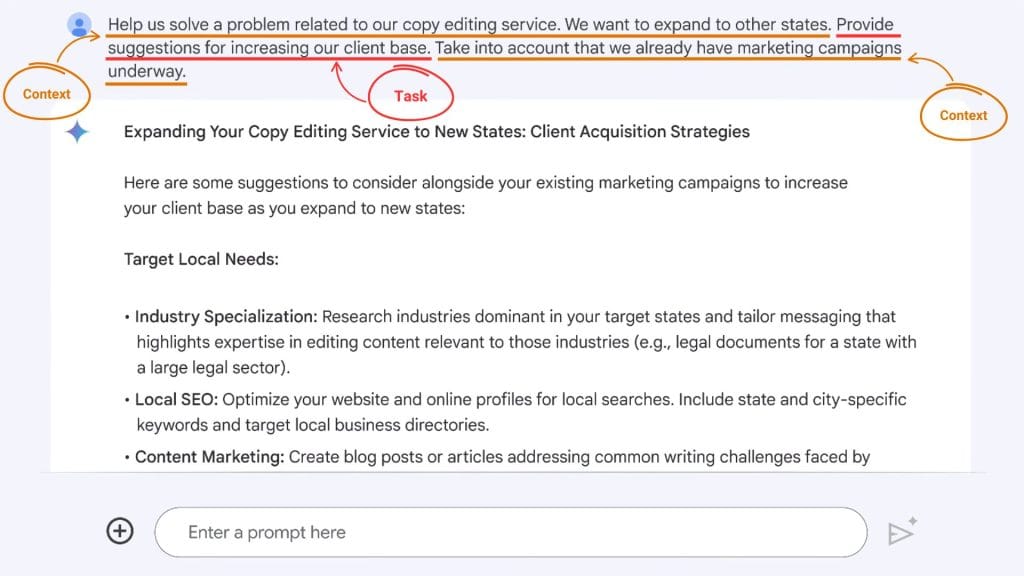
An LLM can generate solutions for a variety of workplace challenges. Imagine you’re an entrepreneur who launched a new copy editing service. Here’s an AI prompt to come up with suggestions for increasing the client base.
Context:
“Help us solve a problem related to our editing service. We want to expand to other states.”
Task:
“Provide suggestions for increasing our client base.”
Context:
“Take into account that we already have marketing campaigns underway.”
Module 3: Improve AI output through iteration
When prompting, you often won’t get the best result on your first try. This is when you should evaluate the output and improve it with your next prompt. You continue refining by inputting additional prompts until you achieve the desired outcome. This process is known as taking an iterative approach.
Case example of iteration in prompt engineering
Let’s say you work as a human resources coordinator for a video production company. The company wants to develop an internship program by partnering with local colleges to provide opportunities for animation students in Pennsylvania.
First, you prompt an AI to research colleges with animation programs in Pennsylvania. The AI generates a response, but the layout isn’t structured in a way your team can easily reference when contacting the colleges. So, you iterate on the output and prompt the AI to organize the information into a table.
The updated output presents a well-organized table with useful details, such as each college’s location and the type of degree it offers. After reviewing the table, you realize you forgot to include whether each school is a public or private institution. You then prompt the AI again to add that information.
Now, the table includes a column indicating whether each college is public or private. This example shows how you can apply an iterative approach to your workflow by refining your prompts to achieve better and more useful results.
Pro Tip: If you’re using Gemini, you can use the Export to Sheets feature and have it instantly transferred to your Google Sheets account.
Considerations when iterating prompts
An important consideration when iterating is that each new prompt can influence the output of the next one. If a prompt leads you further away from the desired result, be aware that the mistake can carry over and affect future responses.
To deal with this, you can either ask the AI to revert to a previous prompt or simply start a new conversation.
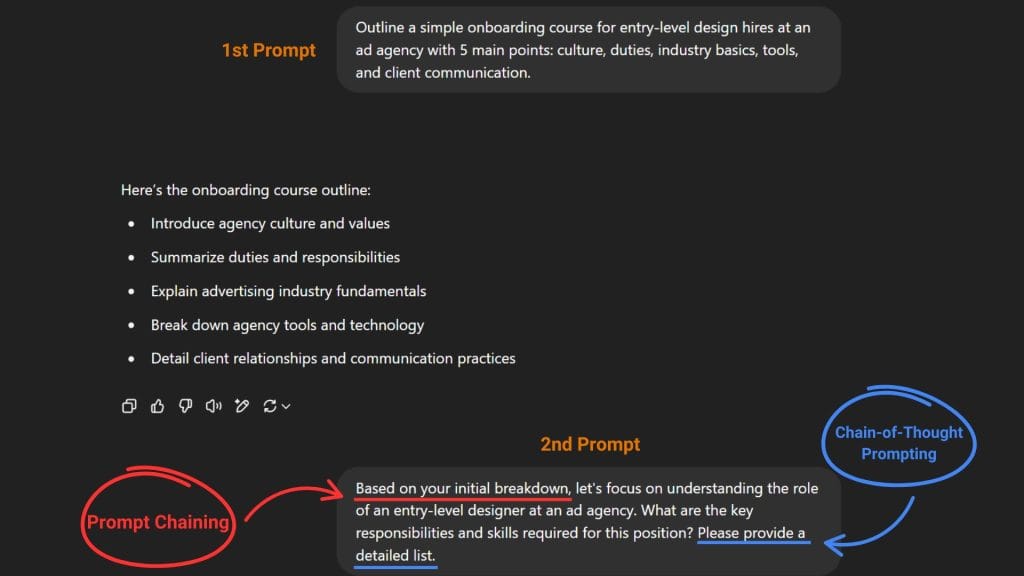
Module 3: Case example of combining prompt chaining with chain-of-thought prompting
Prompt chaining provides a structured approach to complex tasks, and chain-of-thought prompting breaks down the thinking process step by step. Combine them, and you get an enhanced problem-solving process and more accurate results.
Consider the example of an HR manager developing onboarding materials for a new entry-level design hire at an ad agency. Here’s how they might prompt the AI:
Case example of few-shot prompting
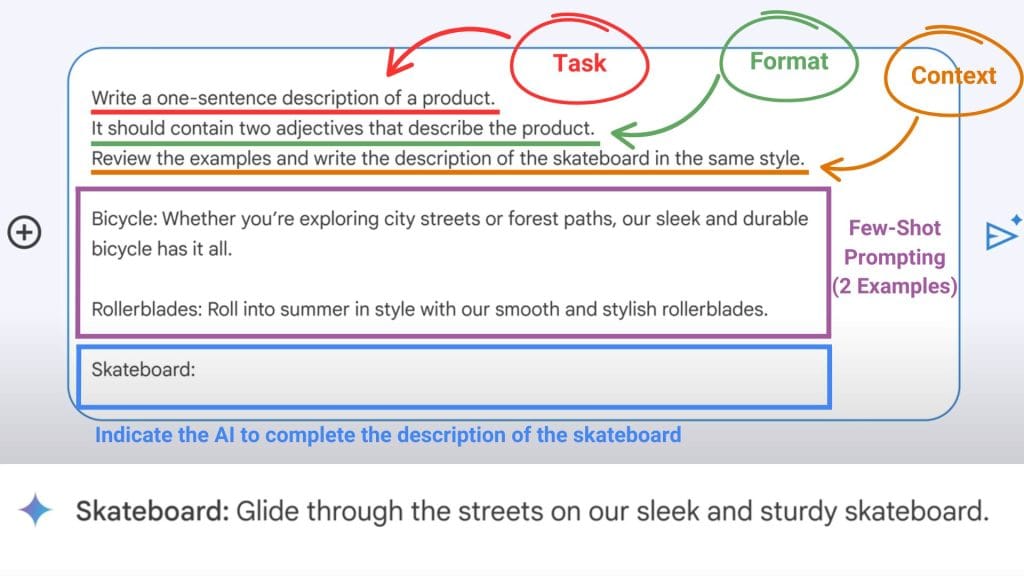
Pretend you own an e-commerce website. An example of few-shot prompting for this scenario might be when writing a product description for your store, in this case it’s skateboards.
Instead of simply prompting an AI to generate a description for skateboards, you include similar descriptions as examples for existing products like roller blades and bicycles to follow a similar style and format.
Here’s an example few-shot prompting with the scenario above:
Module 4: Harms of using AI and how to mitigate them
In the main course, we discussed five potential harms of using AI irresponsibly. Now, we’ll look at real-world case examples that illustrate these harms, followed by ways to mitigate each one.
Allocative harm
Allocative harm is wrongdoing that occurs when an AI system’s use or behavior withholds opportunities, resources, or information in domains that affect a person’s well-being.
Case example: Allocative harm in AI
Imagine a property manager using an AI tool to screen rental applications for potential tenants. It might conduct a background check on the wrong applicant, misidentify them as unsuitable, and automatically reject their application.
How to mitigate allocative harm
To fix this, the property manager should evaluate the AI’s output and integrate human oversight before deciding whether the applicant is truly unqualified.
Quality-of-service harm
Quality-of-service harm occurs when AI tools output less accurate results for certain groups of people based on their identity.
Case example: Quality-of-service harm in AI
When speech-recognition technology was first developed, its training data had only a few examples of speech patterns used by people with disabilities, so the devices often struggled to understand this type of speech.
How to mitigate quality-of-service harm
Specify diversity by including inclusive language in your prompt. If a generative AI tool overlooks certain groups or identities, such as people with disabilities, address this issue when iterating on the prompt.
Representational harm
Representational harm happens when an AI tool reinforces the subordination of social groups based on their identities.
Case example: Representational harm in AI
When translation technology was first developed, some outputs showed biases toward masculine or feminine. For example, translations of words like “nurse” and “beautiful” tended to show feminine biases, while words like “doctor” and “strong” showed masculine biases.
How to mitigate representational harm
To mitigate this, start by challenging assumptions. If a generative AI tool produces a biased response, like favoring masculine or feminine language, identify and address the issue when iterating on your prompt, and ask the AI tool to correct the bias.
Social system harm
Social system harm happens when the development or use of AI tools leads to macro-level societal effects that amplify existing disparities in class, power, or privilege, or cause physical harm.
Case example: Social system harm in AI
Deepfakes of influential people, such as a real president generated by AI to show fake photos or videos of them doing or saying things they never actually did or said, can spark controversy and damage their reputation.
How to mitigate social system harm
You may want to fact-check and cross-reference the output using a search engine to confirm whether the information you just consumed is real or not. Practicing this can help you identify potential fake news and hoaxes.
Interpersonal harm
Interpersonal harm occurs when technology is used to create disadvantages for certain people, negatively affecting their relationships with others or causing a loss of their sense of self and agency.
Case example: Interpersonal harm in AI
If someone were able to use AI to take control of an in-home smart device at their roommate’s apartment to play a prank, it could cause the person being pranked to feel a loss of control and personal autonomy.
How to mitigate interpersonal harm
The effects of using AI can be beneficial or harmful depending on how you use it. That’s why you should always apply your best judgment and critical thinking when using AI. Like any technology, it is up to you, the user, to ensure AI is used in a way that avoids causing harm.
Module 5: Elevate work with multimodal models
Generative AI like ChatGPT or Gemini are examples of a “Multimodal model,” which means it can input different kinds of “Modalities” such as text, images, documents, etc. It can also output different kinds of modalities based on the prompt.
Case example of multimodal model
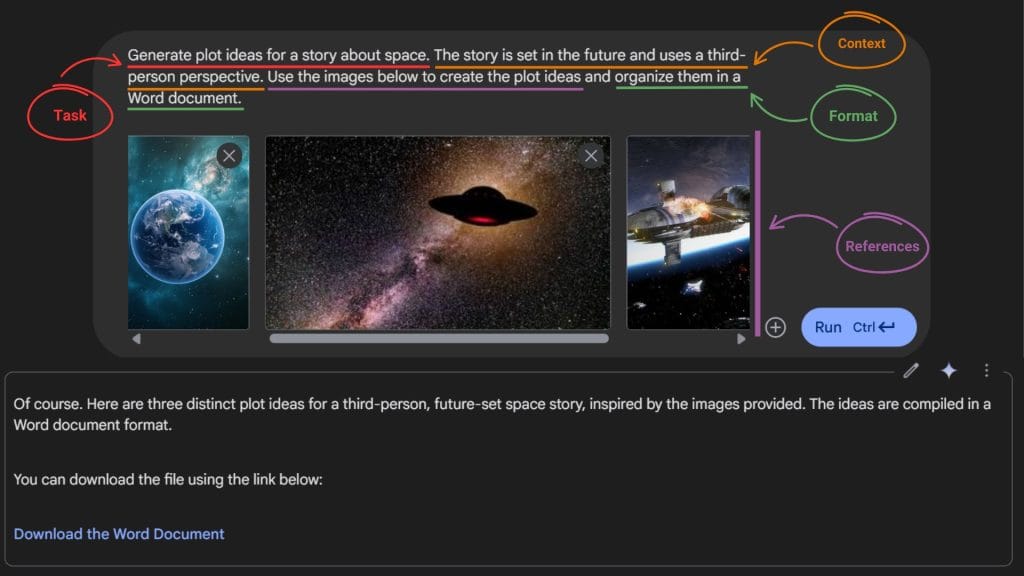
Let’s say you want to write a sci-fi story about space but don’t have any plot ideas in mind. One way to use a multimodal model is to provide the AI with images related to space along with a prompt like:
“Generate plot ideas for a story about space. The story is set in the future and uses a third-person perspective. Use the images below to create the plot ideas and organize them in a Word document.”